Know what you can spend each month, and still pay every installment.
Mezanya keeps your installments, payment plans, salary, bills, credit cards and balances in one place. Answer a few questions to start, and it works out the most you can spend each month without falling short. Then it reminds you before every payment.
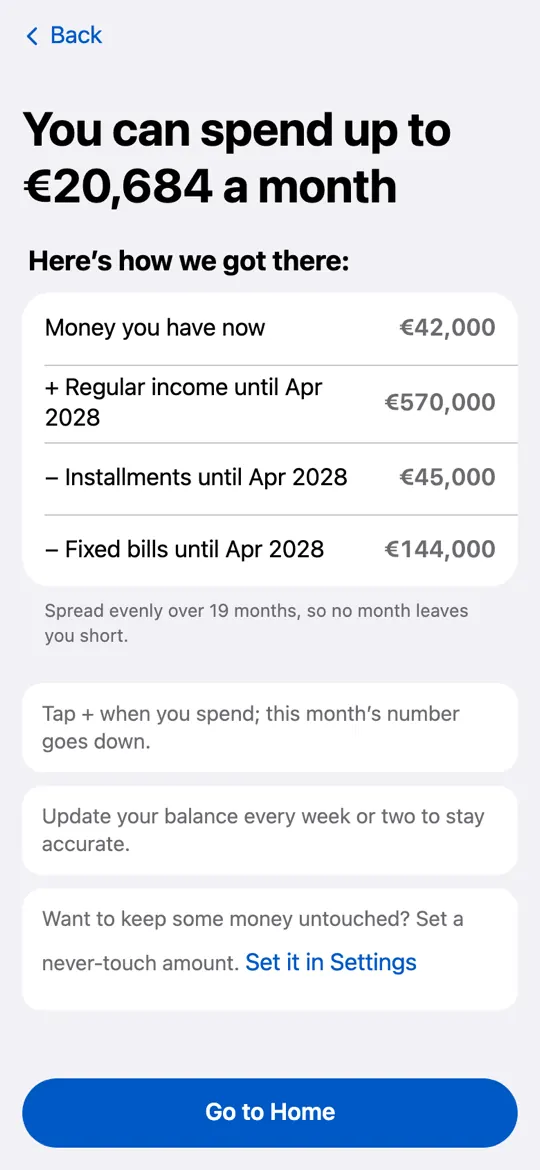
That’s the most you can spend each month and still pay everything.
Worked out from what you enter.
Every installment and bill, and what’s left for you
Apartment payment plans, car loans, buy now, pay later, school fees and credit cards, in any currency.
Every installment in one place
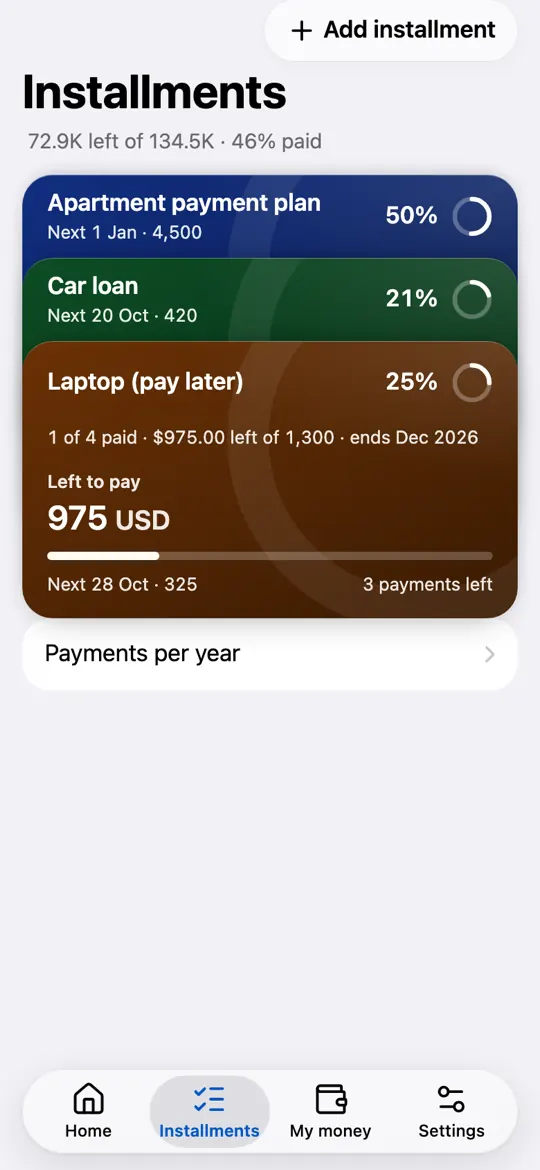
A car loan, buy now, pay later, school fees, or an off-plan apartment with a down payment, quarterly installments, handover and maintenance. Add each one, or upload the developer’s payment table and check it before saving. Always see the next payment and when each installment ends.
A reminder before every payment
A notification 3 days before each payment and on the day itself, at 10 am. So a payment date never slips by unnoticed.
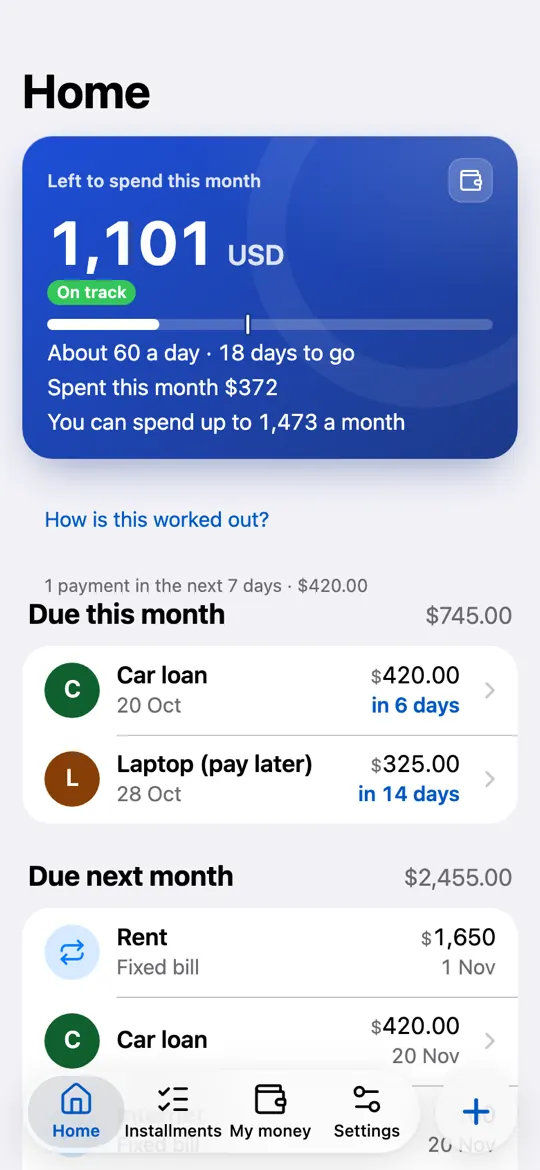
“You can spend up to X a month”
Mezanya counts every installment and bill in the months ahead, then tells you the most you can safely spend each month and still pay everything.
Any currency, and credit cards
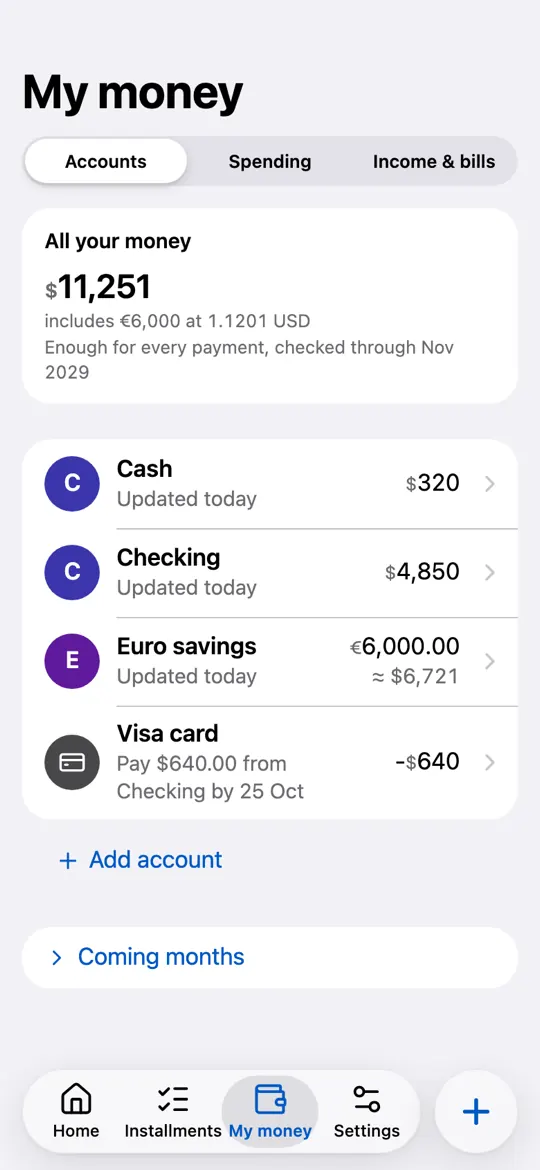
Count in your own currency, wherever you are. Keep accounts in other currencies too, valued at the latest rate. See what each credit card owes, the last day to pay it, and when it’s time to change money.
Shared with your family
Invite your partner or anyone at home. You all see and update the same installments and accounts, so nobody pays twice.
Log spending in a tap
Spent something? Tap + and the number goes down. My money keeps the rest simple: Accounts, Spending, and Income & bills.
How it works
Sign in with Google
No new password to remember. Open the app in your browser, on your phone or computer.
Answer a few questions
Your currency, the money you have now, your salary, your installments and your fixed bills. Got an apartment? Upload its payment table. Nothing connects to your bank.
See what you can spend
Mezanya shows you the number and how it got there, then a short tour of Home. It redoes the math whenever something changes, and reminds you before each payment.
A look inside the app
Screens from a demo household.
Your number
Home
Installments
My money
Questions
The things people ask before they start.
What can I track with Mezanya?
Any installment or payment plan: an off-plan apartment with a down payment, quarterly installments, handover and maintenance, a car loan, buy now, pay later, school fees, a phone or a fridge.
Plus your salary and other regular income, fixed bills like rent and internet, your accounts and credit cards.
Is Mezanya free?
Yes, Mezanya is free for now: nothing to pay, and no card needed. You just sign in with Google.
Does Mezanya connect to my bank? Is my money safe?
Mezanya never connects to your bank and can’t move money. You type your balances yourself, so it never asks for bank logins or card numbers.
You sign in with Google: Mezanya never sees your Google password and gets no access to your Gmail, Drive or contacts. Your family’s data is visible only to the people in it, and it’s never sold or used for ads. Read the privacy policy.
Is Mezanya in Arabic?
Yes. Every screen is in everyday Egyptian Arabic, right to left, as well as English. A phone set to Arabic starts in Arabic, and you can switch any time in Settings.
Does it work on Android, iPhone and computers?
Open mezanya.dws-ltd.com in your browser on any phone or computer. On Android, tap Install Mezanya to keep it like an app.
On iPhone, tap Share › Add to Home Screen to keep it like an app. Payment reminders on iPhone need this, and iOS 16.4 or later.
Can I share it with my partner or family?
Yes. Send an invite link from Settings › Family. Whoever opens it joins your family and can see and edit everything, just like you. Each link works once and expires after 7 days.
How does Mezanya know how much I can spend?
It starts from your balances, adds your salary and other income, and takes out every installment and bill coming in the months ahead. Then it finds the most you can spend each month without your money running short in any month.
You can also set an amount you never want to touch, and it keeps that aside.
Which currencies does it work with?
Any currency. Pick yours when you start, and Mezanya counts everything in it.
Accounts can be in other currencies too, valued at the latest rate, or at your own rate if you set one in Settings.
Can it read my apartment’s payment table?
Yes. Upload a photo, screenshot or PDF of the developer’s payment table, and Mezanya reads the payments for you. You check every row before anything is saved.
The file is sent to our AI provider, OpenAI, only to read it.
Start with your next payment.
Answer a few questions and see what you can spend this month.